Use case
As-is process documentation from how work is really done
As-is process documentation records how a process is really performed today, not how a manual says it should run. Opus (task mining) expands each recorded task case into its steps, and Favus (process mining) maps the end-to-end flow from your event logs.
Why written procedures miss how work is done
Procedures written from interviews describe the intended process, and they drift from practice as people find their own way through the work.
Interviews capture the usual case
People tend to describe the typical case, not the workarounds they use for everything else.
One process, many versions
Each team, and each person, may do the same task differently, and one written version hides that.
Procedures that do not match the desk
A procedure that does not match the desk work is hard to follow, so people learn from colleagues instead.
How does Optimus Hive document processes as they are really done?
Record real cases, review them step by step, approve the best method and guide people with it, then map and model the whole process.
Record real cases
Employees record a task each time they do it, with a case or reference ID. Opus captures the applications, websites and time involved on their Windows desktops.
Review each case step by step
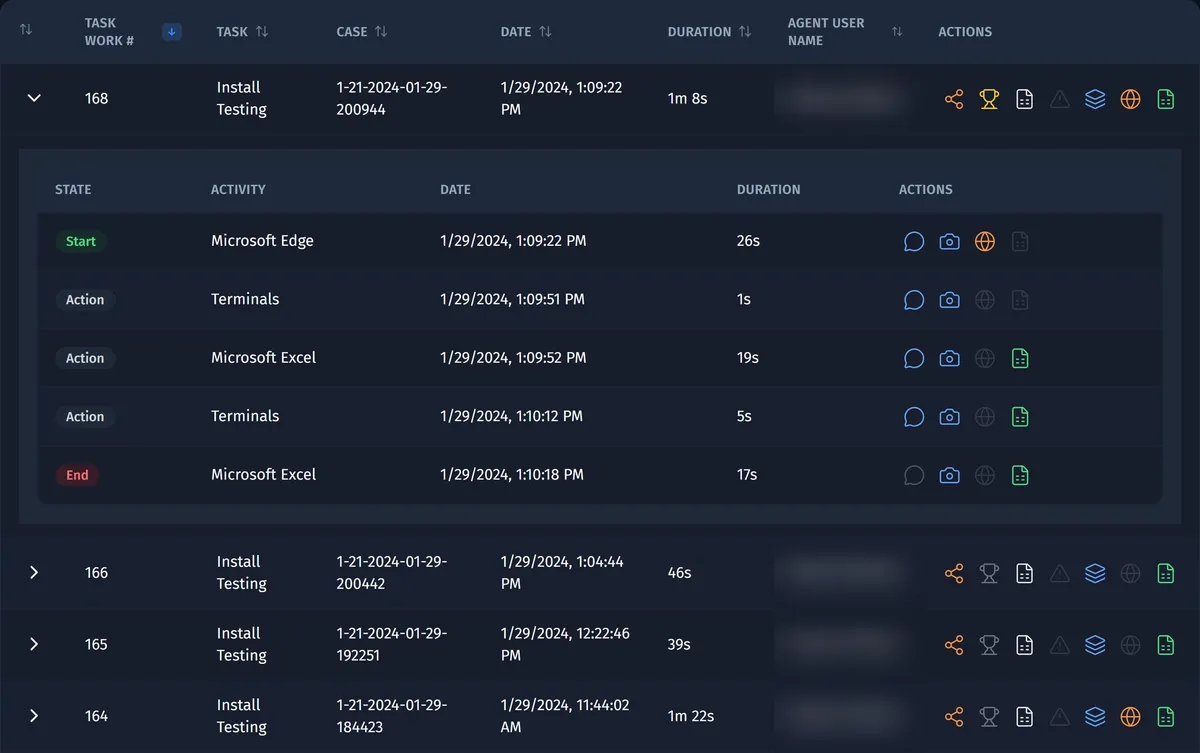
Analysts open a recorded case to see every step with its time and duration, and add comments where a step needs explaining.
Approve the method and guide people with it
Mark the best recorded run as the approved way of working. Employees find it in their Task Library, and Desktop Copilot shows it as a checklist of steps, tips and links to procedures in the matching application.
Map the end-to-end flow
Favus draws the process map from your business systems' event logs, so the documentation also covers the steps that happen between desks.
Model and export the process in Via
In Via (transformation planning), document the process at up to three levels, with each task's performing role, applications, business rules, data sensitivity and handoffs. Export the process catalog to Excel, or a process and its task flow as a basic BPMN 2.0 file.
What you get: documentation that matches the desk
You get documentation built from recorded cases: the steps people take, the method they should follow and a model of the whole process.
Step-by-step case records
Each recorded case of a task broken into its steps, with the time and duration of each and your analysts' comments.
Task and process maps
A task process map of each recorded task with its variants, and a Favus process map of the end-to-end flow.
Approved task methods
The best run of each task, in the employee's Task Library and on screen as a Desktop Copilot checklist.
A process catalog
A catalog of your processes and tasks, with the handoffs between them, that you can export to Excel.
A basic BPMN 2.0 export
Each process and its task flow as a basic file in BPMN 2.0, the standard notation for process diagrams.
Standard operating procedures from real cases
In the Optimus Hive web app, Favus can turn selected steps of a real case into a standard operating procedure. The procedure is built by rules from the case, not written by AI.
Built from a real case
Choose the steps of a recorded case to include, and a reviewed redaction policy is applied before the procedure is saved.
Approved by a second editor
Each version needs a second editor's approval, and only approved versions can be exported as Markdown.
BPMN 2.0 models in Favus
Import or export BPMN 2.0 models in Favus, so a documented model and the recorded cases sit in one place.
Questions about as-is process documentation
Process and operations teams ask these questions about documenting work with Opus, Favus and Via.
What is as-is process documentation?
As-is process documentation describes how a process is performed today, including its variations and workarounds. As-is documentation is the baseline for a redesign, or for moving part of the work to AI agents. Optimus Hive builds it from recorded task cases and event logs rather than from interviews.
Does Optimus Hive write the documentation for us?
No: Optimus Hive gives you the recorded evidence, and your analysts decide what becomes the documented method. Opus expands each recorded case into its steps and lets analysts approve the best run. Via holds the process model that your team documents.
Can we export the documentation?
Yes: Via exports your process catalog to Excel, and each process with its task flow as a basic BPMN 2.0 file. The recorded cases and approved methods stay in Opus, so the evidence behind each documented step remains available.
Document a real process in a demo
Request a demo and pick a process your team needs to document. We'll show the recorded cases, the approved method and the process model in Via.