Task mining vs process mining: how Opus, Favus and Via fit together as a method
Task mining records how people do tasks at their desktops; process mining rebuilds how whole cases flow through business systems. Opus (task mining) and Favus (process mining) show how work runs today; Via (transformation planning) plans, prices and tracks its move to AI agents.
How is task mining different from process mining?
Task mining uses desktop activity, so it covers steps that business systems don't log. Process mining uses system event logs, so it follows each case from start to end.
| Aspect | Task mining: Opus | Process mining: Favus |
|---|---|---|
| Data source | Desktop activity from a Windows agent: applications, websites and time. Most other data types are optional and set per department. | Event logs from your business systems, with a case ID, an activity and a timestamp for each event. |
| Unit of analysis | Tasks, and each recorded case of a task at the desktop | Business cases, followed across systems from start to end |
| Main outputs | Task process map with variants, loops and cost per case; task dashboards | Process map, variants, deviation from the most common path, throughput, cycle times, benchmarking and handovers |
| Typical question | How is this task actually done, and what does it cost? | How does the end-to-end process run, and where does it slow down? |
| Set-up | Install the agent with an MSI package, enroll each PC once, and publish a privacy policy | Create a project and upload an event log |
Where they meet Opus and Favus connect in one place: the unified case timeline, explained below.
The method at a glance
Optimus Hive follows three steps on one platform: Opus, then Favus, then Via. One link between the products is made in software, at the level of each case; every other hand-off between products is made by your team.
The method runs in three numbered steps, with named beats between them, in this order.
- Step 1 · See how the work is done (Opus). The Opus agent records applications, window titles, websites and time on Windows PCs, under a privacy policy your administrators publish. Employees record tasks and can add a case or reference ID.
- Step 2 · See how the process runs (Favus). Favus builds the process map from your business systems' event logs, uploaded as a file or pulled on a schedule, and marks the slowest step.
- Connect each case (Opus and Favus). The unified case timeline places the desktop work recorded for one case between that case's business-system events, tagged as matched on the exact case ID.
- Design the agent (Agent Studio, in Opus). Opus lists desktop work that repeats across people and days as automation opportunities. From an accepted opportunity, Agent Studio drafts an AI-agent design (configuration, tools, guardrails and a test scenario), each part stamped "Draft: review required". Agent Studio needs an AI provider set up for your workspace, and its AI drafts are not part of the free trial.
- Step 3 · Plan, price and track (Via). Your team brings the findings into Via and gives each task a future performer: a human role or an AI-agent role. Via calculates hours and cost, builds the business case with its payback point, and tracks pain points, change requests and initiatives.
- Prove the value. Via compares forecast savings with the actual savings your team enters each month. Separately, Measured Objectives track average case duration, recorded cost and automation rate from your Favus process data.
How the steps connect. Only one link is made in software: the unified case timeline between Opus and Favus. It works once a correlation policy is set and employees record the same case ID the business system uses. Your team carries every other hand-off across. Favus reads event logs from your business systems, not from Opus. Nothing flows into Via automatically: your team enters the tasks, roles and times, and the monthly actual savings. Measured Objectives and Via's value tracking are not linked.
The result is a costed, tracked plan for your agentic workforce.
See how the work is done
Record how each task is done on the desktop, and what it costs.
See how the process runs
Map how cases flow through your business systems, and where time is lost.
Connect each case
Opus and Favus link at the case level: the unified case timeline shows desktop work inside each business case.
Design the agent
Agent Studio in Opus drafts an AI-agent design from a recorded task, for your team to review. Agent Studio needs an AI provider set up for your workspace, and its AI drafts are not part of the free trial.
Plan, price and track
Your team brings the findings into Via, which plans, prices and tracks the move to AI agents.
Prove the value
Track realized savings against the forecast in Via and, separately, results measured from your Favus process data.
See every product and capability on the Optimus Hive platform.
Step 1: record desktop work with Opus
Opus records the applications, websites and time behind each task on Windows desktops, under a privacy policy your administrators publish. Employees record their tasks and can add a case ID, so each recorded case can be followed step by step.
Opus collects no work activity until an administrator publishes the device privacy policy, and collection pauses if the policy lapses. More on Opus task mining software.
Capture
The Windows agent records each application and website in use, the window title and how long each activity lasts. Most other data types are optional and set per department.
Task recording
Employees start, pause and stop a task recording from the tray or their portal, and can log exceptions. Opus tags that activity with the task and its case ID.
Task process map with cost
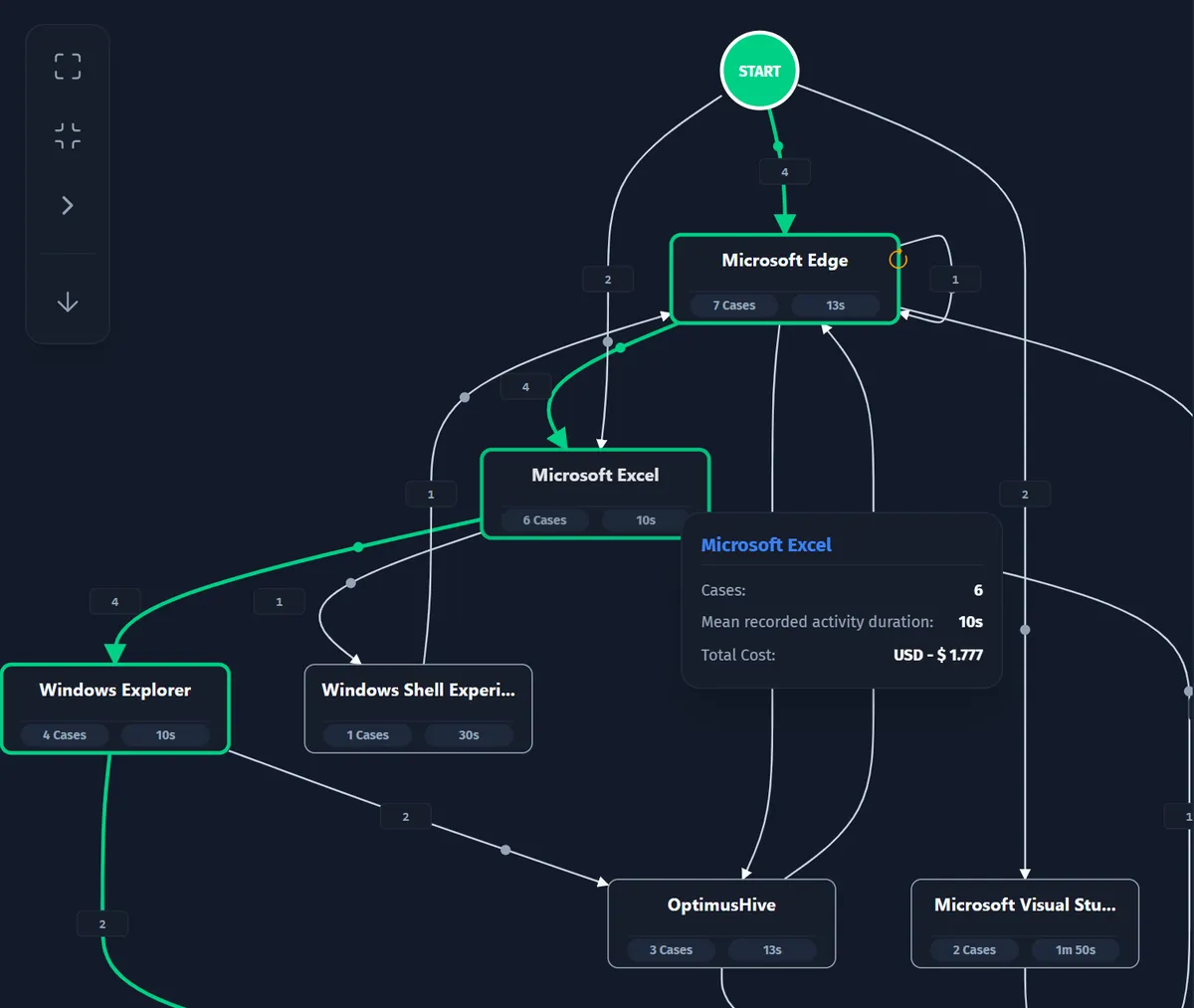
Opus draws each task's steps, variants and loops from the recorded cases, and costs every case from its duration and the department's rate.
Step 2: map the end-to-end process with Favus
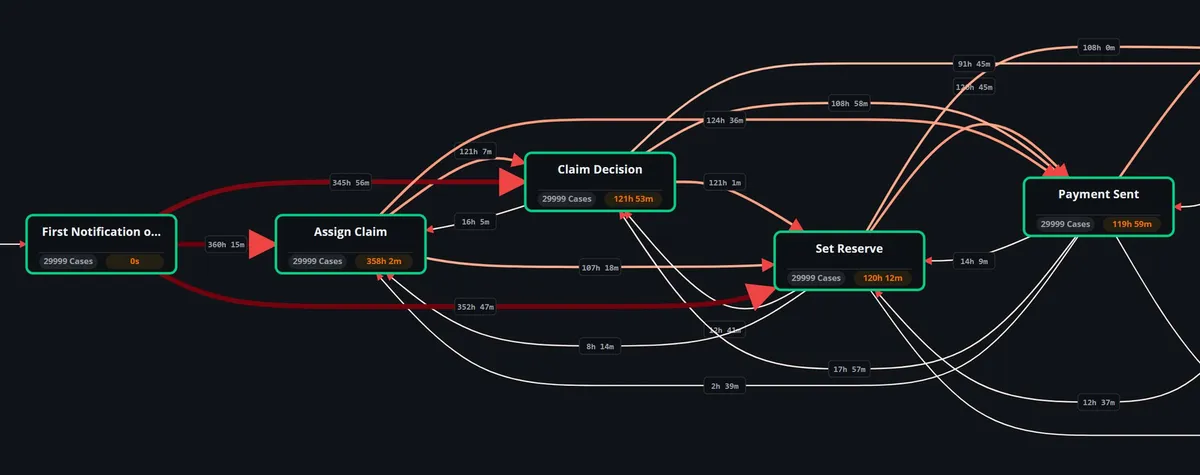
Favus turns event logs from your business systems into a process map, with the variants cases take and the time between steps. Each event needs three fields: a case ID, an activity and a timestamp.
The event log comes from your business systems, not from Opus. You can upload it as a file. An administrator can also schedule ingestion from an HTTPS JSON API or an approved SQL Server view, in the Optimus Hive web app. More on Favus process mining software.
Process map
Frequency and performance views, with the most common path highlighted and an animated case flow.
Variants
The top 100 variants with case count, coverage and average duration, and which cases leave the most common path.
Cycle times
A matrix of the average time between each pair of steps, showing where waiting time builds up.
Where Opus and Favus connect: one case, two views
The unified case timeline shows the desktop work Opus recorded for a case next to that case's events from your business systems. Each match is labeled matched, ambiguous or unmatched, and administrators can confirm or exclude it.
Case 4711 (illustrative)
- Business system (Favus)Received · 09:02
- Desktop (Opus)ERP and spreadsheet work recorded for case 4711Matched
- Business system (Favus)Approved · 11:40
What it needs
A correlation policy
For a Favus project, an administrator sets which Opus tasks carry a case ID. The policy also sets whether IDs must match exactly or may differ in upper and lower case.
The same case ID
When employees record a task in Opus, they enter the case or reference ID the business system uses. Entering it can be made required for a task.
The only software link The unified case timeline is the only link between Optimus Hive products made in software. Corrections to matches keep their history, and every other hand-off in the method is made by your team.
Which work should move to AI agents first?
Look first at frequent, stable, costly work with few exceptions, using evidence from Opus, Favus and Via. The products rank and cost the candidates; your team decides what moves.
Opus: cost and repetition at the desk
Opus shows what each task and variant costs, and its Auto Discovery view classifies recorded activities by automation method, without estimating savings. Opus also finds work patterns that repeat across people and days, for reviewers to accept or reject. Investment ranking also orders candidates by volume, stability and exceptions against your cost assumptions.
Favus: where cases slow down
Favus shows which transitions between steps take longest, and which vendors, customer types or resources have the slowest cases.
Via: where the hours and cost sit
Via lists the tasks with the most manual hours and the costliest tasks and processes, and plots initiatives by value against effort.
Design the agent with Agent Studio in Opus
From a task recorded in Opus, Agent Studio drafts an AI-agent design: its configuration, tools, guardrails and a test scenario. Every AI-drafted output is marked as a draft for your team to review.
Agent Studio works inside Opus and uses tasks recorded in Opus. More about Agent Studio in Opus.
Evidence first
Agent Studio first measures the recorded task: its cases, variants, most common path and bottlenecks.
Drafts for review
AI then drafts the agent's configuration, tool definitions, validation rules, guardrails (including a list of personal data to mask) and a test scenario.
Starter code
Agent Studio also drafts starter code for the agent, labeled as a draft that needs review.
Before you start Agent Studio's AI steps need AI to be set up for your company's workspace. They are not included in the free trial.
Step 3: plan the move to AI agents with Via
Via plans, prices and tracks the move of work to AI agents. For every task, your team sets the current and future performer, human or AI agent, and Via calculates the hours, cost and savings.
Via then builds the business case and a prioritized portfolio of initiatives. You can test options first, such as moving work from one role to another, and compare the cost. See how to plan the move to AI agents with Via.
Current and future way of working
Each task records who does it, the time it takes, workload coverage and FTE, today and in the future.
Human and AI-agent roles
Roles are typed Human or AI, each with an hourly cost. Via shows the share of future hours planned for AI agents.
Business case and priorities
Investment and savings by quarter, cumulative cash flow, ROI and payback, plus initiatives plotted by value against effort.
Governed change
Change requests with implementation and rollback plans, grouped into initiatives and planned on Kanban boards, a Gantt timeline and a change calendar.
How findings reach Via Your team brings the findings from Opus and Favus into Via. Nothing flows into Via automatically.
Prove the value
Via compares forecast savings with realized savings, using the actuals your team enters each month. Measured Objectives track average case duration, recorded cost and automation rate from your Favus process events, with the events behind each number.
Use the two side by side: Via shows whether savings are on plan; Measured Objectives show how the process moves against its baseline and target.
Value realization in Via
Record monthly actual savings, budget spent and other KPIs for each initiative, and see the variance against the forecast.
Measured Objectives
Set a baseline and a target for average case duration, recorded cost or automation rate, and follow progress measured from process events.
The events behind each number
Open an objective to see the exact events that contributed to it.
Two separate measures Via's value tracking and Measured Objectives are not connected. Your team compares the two.
How does evidence-based discovery compare with workshops?
Workshops and interviews describe how people think the work is done; recorded desktop activity and business-system event logs show how it was done. Opus and Favus supply that evidence.
Building the process map from recorded data this way is called automated process discovery.
| Aspect | Workshops and interviews | Evidence from Opus and Favus |
|---|---|---|
| Source of evidence | What participants recall and describe | Recorded desktop activity (Opus) and business-system event logs (Favus) |
| Coverage | The people, cases and examples discussed in the sessions | The PCs you enroll, within your privacy policy, and every case in the event log |
| How cost is derived | Figures participants supply or agree on | Opus costs each task case from its recorded duration and the department's rate. Via then calculates hours and cost from the volumes, times and role rates your team enters. |
| How results are checked | A later round of interviews or surveys | Any Opus KPI can be saved with its source records and reopened with the same numbers. Via compares forecast with realized savings. |
Questions about using task mining and process mining together
Answers to common questions about combining task mining and process mining, and about how Opus, Favus and Via connect.
Can task mining replace process mining?
No, because each method misses what the other sees. Task mining (Opus) can't see the steps of a case that happen inside business systems, or how long the case waits between them. Process mining (Favus) can't see the desktop work that business systems don't log, such as checks in a spreadsheet or a browser.
Can task mining and process mining be used together?
Yes: Opus and Favus work as two steps of one method, and they link at the level of each case through the unified case timeline. Once an administrator sets a correlation policy and employees enter the business system's case ID, the timeline shows the desk work inside each case.
When should I start with process mining instead of task mining?
Start with process mining when your business systems already log the process and your question is about whole cases, such as why orders wait. Start with task mining when much of the work happens on desktops outside those systems, or when you need to know what each task costs. Favus starts from an event log file; Opus starts once the agent is installed and a privacy policy is published.
How does task mining work?
Task mining records desktop activity and rebuilds each task from it. With Opus, IT installs the Windows agent and enrolls each PC, and an administrator publishes the device privacy policy that turns collection on. Employees can then record tasks, and Opus maps each task's steps, variants and cost.
Which steps of the method are connected by software?
Only one: the unified case timeline, which links Opus desktop activity to Favus business cases. It works once an administrator sets a correlation policy and employees enter the same case ID the business system uses. Favus reads event logs from your business systems, not from Opus. Every other hand-off is made by your team, which enters the tasks, roles, times and monthly actual savings in Via; nothing flows into Via automatically.
See all three steps in a demo
Request a demo to walk through Opus, Favus and Via with your own questions. The free trial covers step 1, Opus task mining.