
Blog
How to find rework loops in a task on the desktop
A practical guide for operations and transformation leaders on finding rework loops inside a desktop task and tracing them to cause and cost.
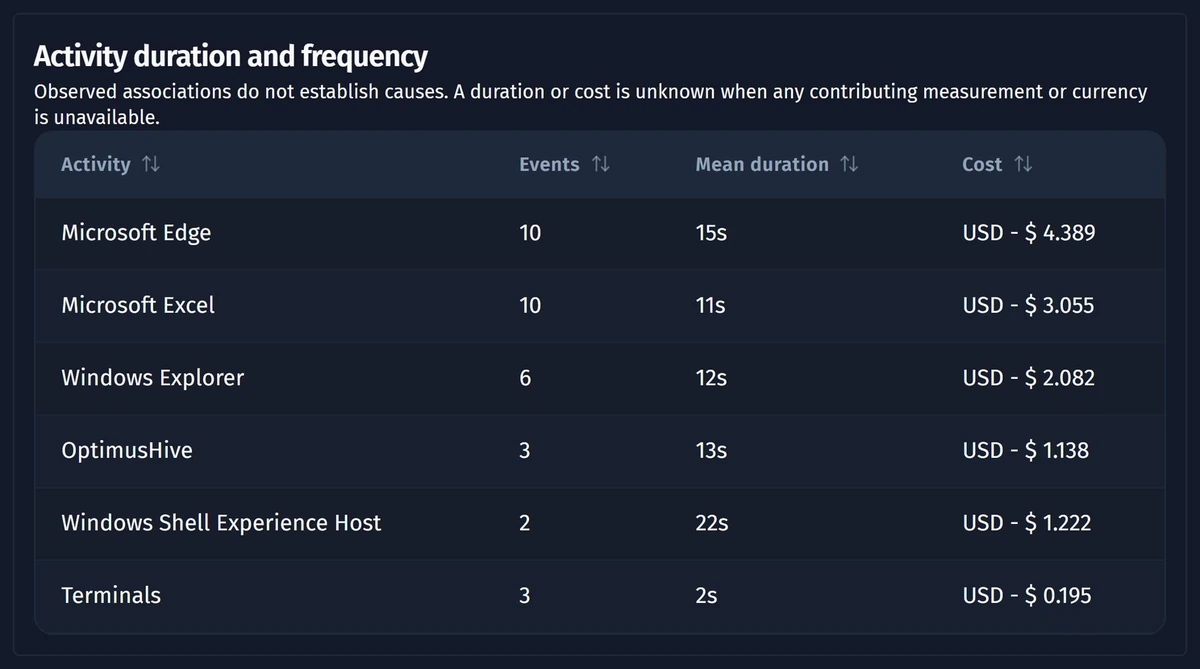
You find rework inside a desktop task by comparing many recorded instances of the same task. Group them into variants, look for steps that repeat or return to an earlier step, then trace each loop to its cause and its cost. The loops show where people redo work and where fixing inputs pays off.
- Rework inside a task shows up as loops: steps that repeat or send the case back to an earlier step.
- Comparing the variants of a task separates the standard path from the paths that carry rework.
- A loop matters when it is frequent, long or costly, not merely because it exists.
- Root causes of rework usually sit upstream: missing inputs, unclear rules or awkward applications.
- Remove rework loops before you standardize or automate a task, or the new design inherits them.
What counts as rework inside a desktop task?
Rework inside a desktop task is any effort spent redoing steps that should have been done once. In a recorded task, rework appears as a loop: the case repeats a step or returns to an earlier step before it can finish.
A desktop task is a unit of work a person completes on a computer, such as posting an invoice or updating a customer record. A task case is a recorded instance of that task. Rework loops in a task are easy to define and hard to see, because each loop looks like normal activity when you watch a single case.
- Repeated steps: the same field or screen is edited again within the case.
- Backward jumps: the person returns to an earlier application or step to correct something.
- Restarts: the case is abandoned and begun again from the start.
- Ping-pong: the person switches back and forth between applications to reconcile data.
Why does rework hide inside a desktop task?
Rework hides inside a desktop task because it happens between the system records that most teams analyze. Business systems log that a transaction was saved, not how many attempts it took to get there.
Interviews and workshops rarely surface rework either. People describe the task as it should run, and they stop noticing corrections they make out of habit. Supervisors see the output, not the loops behind it.
That is why teams turn to task mining software, which records how people carry out desktop work and turns those recordings into sequences of steps. Once the steps are visible across many cases, loops become patterns rather than anecdotes.
How do task variants reveal rework?
Task variants reveal rework by showing every distinct path that people take through the same task. A variant is a unique sequence of steps; cases that follow the same sequence belong to the same variant.
Start by finding the standard path, the variant that completes the task without detours. Then compare the other variants against the standard path. The differences tell you where cases deviate, and many deviations are rework.
- Look for variants that contain the standard path plus extra repeated steps.
- Look for variants that are longer than the standard path but end with the same result.
- Separate legitimate variation, such as a different customer type, from correction work.
- Check which variants carry the most cases, because common rework matters more than rare rework.
Not every variant is waste. Some paths exist for good reasons, such as a different product or an approval rule. Your team needs to judge which deviations add value and which only repair earlier mistakes.
Which rework loops deserve attention?
The rework loops that deserve attention are the ones that are frequent, long or costly. A loop that appears in a handful of cases and takes seconds is noise; a loop that appears in most cases is a design problem.
Rank loops by how often they occur, how much lead time they add and how much effort they consume. Lead time is the elapsed time from the start of a case to its end. A loop that stretches lead time can delay downstream work even when the extra effort is small.
This ranking is close to process bottleneck analysis, applied inside a task rather than across a whole process. The aim is the same: find where time and effort pile up, then focus improvement there.
How do you trace a loop to its root cause?
You trace a rework loop to its root cause by asking what the person was missing or correcting when the loop began. The cause of a loop usually sits before the loop, not inside it.
- Incomplete inputs: the request arrives without the data the task needs.
- Unclear rules: people guess, then correct when a check fails.
- Application friction: validation errors or awkward screens force repeated entry.
- Handoff gaps: information from another team must be looked up again.
Compare cases with the loop against cases without it. Differences in input source, team or application often point to the cause. Confirm the finding with the people who do the work before you change anything.
How Optimus Hive handles rework loops in a task
In Optimus Hive, Opus builds a task process map from recorded cases, with variants and average case cost.
Beyond the task process map, Opus offers views that show loops, root causes and lead times inside a task.
With the task process map and these views in Opus, your team can compare variants, locate loops and see the lead times around them. Your team then decides which loops to remove first.
Rework that spans several systems and teams belongs to the wider process, and the guide on task mining vs process mining explains where each method fits.
What should you do with the rework you find?
Fix the rework you find before you standardize or automate the task. If you automate a task with its loops intact, the new design repeats the same corrections at a larger scale.
- Fix the cause upstream, such as a better intake form or a clearer rule.
- Redesign the standard path so the loop has no reason to start.
- Recheck the variants after the change to confirm the loop has shrunk.
- Only then decide whether the cleaned task is a candidate for automation or an AI agent.
Rework loops in a task are often the clearest signal of where a task is not ready to hand over. Removing them gives your team a shorter, steadier task and a more honest picture of what the task really costs.
Checked automatically against Optimus Hive product documentation before publication.