
Blog
What is a process mining event log? The three fields it needs
Learn what a process mining event log is, which three fields it needs and how to prepare an event log file. For operations and IT leaders.
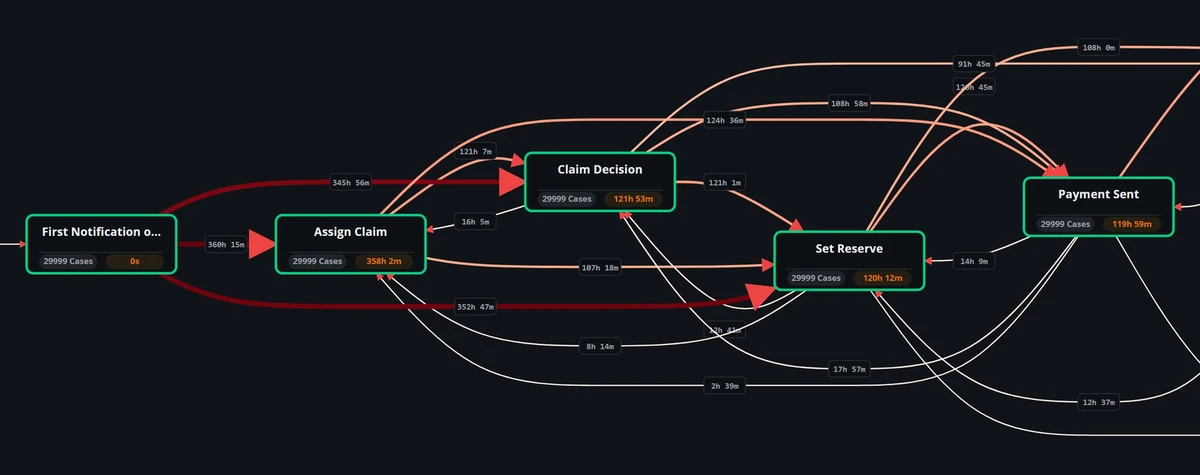
An event log is a record of business events that process mining reads to rebuild how a process runs. Each event needs three fields: a case ID that groups events into a single case, an activity that names the step, and a timestamp that orders the steps. Optional attributes add detail for deeper analysis.
- An event log records the steps of a business process, row by row, as your systems capture them.
- Process mining needs three fields per event: case ID, activity and timestamp.
- Optional attributes such as resource, vendor, customer type and amount let you compare paths and segments.
- Most event log problems come from inconsistent case IDs, vague activity names and mixed time zones.
What is an event log?
An event log is a structured record of what happened in a business process, with a row for each event. Process mining reads the event log to rebuild the actual flow of work, step by step.
Business systems create these records as people and programs do their work. An order is created, an invoice is approved, a ticket is closed. Each action leaves a trace with a reference number and a time.
Teams usually extract the records into an event log file and load that file into a process mining tool. Teams use the event log for automated process discovery, where software draws the process map from the recorded events.
An event log differs from a report. A report summarizes totals; an event log keeps the order of steps for each case, so you see paths, loops and waiting time.
Which three fields does process mining need?
Process mining needs three fields per event: a case ID, an activity and a timestamp. Without any of the three fields, the software cannot connect steps into a process.
Case ID
The case ID names the single instance that moves through the process, such as an order, an invoice or a claim. All events with the same case ID belong to the same journey.
Choosing the case ID is a business decision. In purchasing, the case might be the purchase order or the invoice, and each choice shows a different process.
Activity
The activity names the step that happened, such as Create order or Approve invoice. Activity names should be consistent, readable and at the level of detail your team wants to analyze.
Timestamp
The timestamp records when the activity happened. Timestamps put events in order and let you measure the time between steps, so precision and a shared time zone matter.
Some systems record both a start and an end for an activity. Keeping both timestamps lets you separate working time from waiting time.
Which optional fields make an event log more useful?
Optional fields, often called attributes, add context to each event or case. Common attributes are the resource who did the step, the vendor, the customer type and the amount.
- Resource: the person, team or system that performed the activity, useful for workload and handover questions.
- Vendor: the supplier on the case, useful for comparing how suppliers move through purchasing.
- Customer type: a segment label that lets you compare paths between customer groups.
- Amount: the value of the case, useful for checking whether high-value cases follow stricter paths.
Attributes are optional because the process map works without them. Add attributes when they answer a question your team already has, rather than extracting every column available.
Attributes also support filtering. You can isolate cases above a certain amount or for a single vendor and compare their paths with the rest.
How do you build an event log file from your systems?
You build an event log file by extracting event records from the business systems that support the process, then shaping them into the three fields required. Teams often work through the job in a fixed order.
- Define the process scope and the case ID with process owners.
- List the activities that matter and find where each is recorded in your systems.
- Extract the records, including timestamps and any attributes you need.
- Map system codes to readable activity names and standardize time zones.
- Check a sample of cases with the people who run the process.
Process data often sits in several systems. Teams join the records on a shared reference, such as an order number, so the case ID stays consistent across sources.
An event log shows only what systems record. Steps done on desktops, in documents or in conversation may never reach the event log. To compare the two views, see task mining vs process mining.
What problems should you check before analysis?
Most event log problems come from data quality, not from the analysis. A short review before loading the event log file saves your team from misleading process maps.
- Missing or reused case IDs: events that cannot be grouped, or unrelated cases merged under the same reference.
- Inconsistent activity names: the same step recorded under different labels, which splits a single step into several.
- Timestamp issues: mixed time zones, date-only values or batch times that hide the true order of steps.
- System noise: technical events that do not reflect business work and clutter the map.
- Partial cases: cases that started before or ended after the extraction window, which distort durations.
Fix these event log issues at the source where you can. Document each change to the data so your team can repeat the extraction later.
How does Optimus Hive handle the event log?
Favus builds its analyses from an event log file with three fields per event: a case ID, an activity and a timestamp. Resource, vendor, customer type and amount are optional.
With Favus process mining software, the case ID, the activity and the timestamp are the fields to settle; resource, vendor, customer type and amount are optional.
Reviewed by the Optimus Hive team before publication.